Saturday, July 10, 2010
My Email Truncated Again?
Often in a long email, I receive, I need to press Get More to read the rest of the email. In some of those long emails, after reading all the way down in my Storm, I am greeted by "Truncated xxxx bytes". I look around to find a way the cause and how to deal with it. From my findings, this is caused by way the Blackberry Email System designed, it can only receive max 32 KB of compressed data in the email message body. Here is the document from Blackberry KB13677. Based on the article, the sad thing is there is no way around this, so, yup, you stuck with this issue.


Friday, July 9, 2010
Video Overview Blackberry 9800
Blackberry 9800 is one of the new products that RIM will be launched in 2010. The full specs not yet published but it is going to debut with OS 6.0, be the first RIM's device with a slider keyboard and have touchscreen and a trackpad. Below is the video overview of Blackberry 9800, enjoy
Tuesday, July 6, 2010
New Blackberry Internet Service (BIS) Package from INDOSAT "Paket Irit"
I got the news from INDOSAT mailing list that they launch a new BIS package soon but for those who cannot wait they can give it a try.
News from those who test it, the package is the same as BIS reguler package minus WiFi. It means you can browse, chat & social network with cheaper price in one of the biggest provider here in Indonesia. They call it "paket irit", it will be available as daily, weekly and monthly package
Here is the tariff details:


News from those who test it, the package is the same as BIS reguler package minus WiFi. It means you can browse, chat & social network with cheaper price in one of the biggest provider here in Indonesia. They call it "paket irit", it will be available as daily, weekly and monthly package
Here is the tariff details:
- Irit Harian Rp 4.500
- Irit Mingguan Rp 26.000
- Irit Bulanan Rp 100.000
If you want to try, you can call *123*6# then response "1" for Blackberry on Demand. Response "1" for Info, then "9" (you still cannot see the menu, but it's there). Choose "Irit Harian", "Irit Mingguan" or "Irit Bulanan" afterwards you will receive confirmation message.
Or you can SMS with format "Irit Harian" for daily, "Irit Mingguan" for weekly, and "Irit Bulanan" for monthly to 889


The confirmation message said Rp 4.500 for 1 week and the news said Rp 4.500 for 1 day. We will wait for official news from Indosat. Happy trying :)
Update: this package will give you all access as full package "BIS Reguler", from BBM, chats, Social Networking (Facebook, Twitter, etc), Browser, Email with unlimited bandwidth via APN blackberry. The only difference is if your Blackberry has wifi capability, you can't use APN blackberry via wifi anymore. INDOSAT blocks APN blackberry via the wifi access. For some Blackberry handhelds, like mine Blackberry Storm, this limitation has no effect at all, as Blackberry Storm doesn't come with wifi.
People normally use wifi to connect when they are out of network coverage and/or in overseas. For the price of mentioned above, that is definitely worth it :)
Update: this package will give you all access as full package "BIS Reguler", from BBM, chats, Social Networking (Facebook, Twitter, etc), Browser, Email with unlimited bandwidth via APN blackberry. The only difference is if your Blackberry has wifi capability, you can't use APN blackberry via wifi anymore. INDOSAT blocks APN blackberry via the wifi access. For some Blackberry handhelds, like mine Blackberry Storm, this limitation has no effect at all, as Blackberry Storm doesn't come with wifi.
People normally use wifi to connect when they are out of network coverage and/or in overseas. For the price of mentioned above, that is definitely worth it :)
Monday, July 5, 2010
Lose Your Phone Book No More
I have heard a lot of horror stories people losing their mobile phones either left at public places or by criminal action, or simply your phones had "heart attack" and just died and refuse to revive from its state. It just happened to my in-law and friend, my in-law's phone suddenly just died when she needed to contact her client while the latter got his Blackberry spilled with water and got short-circuit.
Losing a phone is not as hurt as losing all the data inside, especially your phone book. Your list of vital clients, their numbers, emails, addresses can be very hazardous for your health (sorry for the bad pun :P ) or your business. Recovering from the dead phone will not be easy either, normally, it involves flashing ROM which means erasing all the data a.k.a restore to factory settings. So before it happens, prepare yourselves. Here is few options you can choose:
Losing a phone is not as hurt as losing all the data inside, especially your phone book. Your list of vital clients, their numbers, emails, addresses can be very hazardous for your health (sorry for the bad pun :P ) or your business. Recovering from the dead phone will not be easy either, normally, it involves flashing ROM which means erasing all the data a.k.a restore to factory settings. So before it happens, prepare yourselves. Here is few options you can choose:
- Sync your Blackberry via Desktop Manager with your desktop organizer app
I use Windows and Outlook so synchronizing my contacts, tasks, memos, and calendars are part of my daily backup. Just plug my Blackberry Storm, turn on Desktop Manager and it will sync automatic. Backing up all my important organizer data.
You can setup one by following this step by step:
- Open your Blackberry Desktop Manager and click Synchronize

- Click Configure>Synchronization

- Click Synchronization to enter the setup wizard
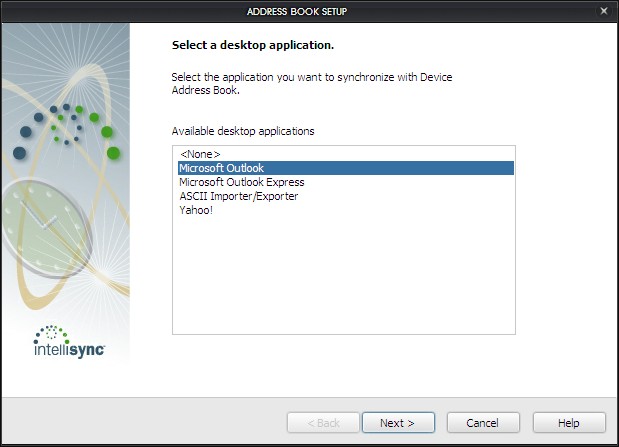
- At the wizard you will ask what data to synchronize. There are Calendar, Memopad, Address Book, Tasks or basically your all organizer data. Click on the data you want to setup then click Setup.
- You will ask to put your organizer desktop application you want to sync to and the direction. I choose one way from device to desktop for my address book as I always add/edit/delete from my Blackberry.


- After done with the wizard. Make sure you tick Synchronize organizer data and then click Synchronize to sync. If you want to sync every time you connect your Blackberry, tick Synchronize the selected items when your device is connected to the Blackberry Desktop Manager.
- That's all, now every time you connect it will sync your organizer data to your desktop application
- Open your Blackberry Desktop Manager and click Synchronize
- Wireless Synchronization to Your Google Account
If you use Gmail as one of your email, this could be the easiest way to backup your contacts.
- In your Blackberry, go to Setup>Email Settings
- Log in to your email settings, if you already have a user
- Choose which gmail account you want to sync and open it
- There is an option for Synchronization Options, tick

- Save it
- Backup Regularly with Desktop Manager
If you are not using any Desktop Organizer Application and not using GMail, you still can backup your contacts but it is required some discipline to make sure it is up-to-date
- Open Desktop Manager and connect your Blackberry
- Click Backup & Restore
- Click Backup
- Choose where you want to save it & click Save
- Use 3rd-party Apps
There are 3rd-party apps that offer backing up your contacts as one of the features. You can use free services like from smrtguard.com they provide backup all your Blackberry data OTA with reasonable price. Or you can search in appworld to find alternatives for backup your contacts.
If you are in Indonesia and happened to use Indosat, they bundle smrtguard and name it i-guard.




Saturday, July 3, 2010
Tips: Autotext Bahasa Indonesia
For those who get Blackberry Storm and Odin as their Blackberry and primary language is not English, SureType is a no no. You will get frustrated or worse throwing your Blackberry as typing can be as pain as hell. If you use Indonesian as primary language worry no more, as you can inject Autotext that is built by someone (anyone know who the first one build this?) into your Blackberry. Immediately, you will fall in love all over again with SureType as it is the best one-handed operation typing.
Here is how
Here is how
- Make sure you backup your Blackberry using Blackberry Desktop Manager before performing this. Here is how to backup:
- Connect your Blackberry with your Desktop
- Open Blackberry Desktop Manager
- Click Backup and Restore
- Click Backup
- Choose where you want to save in your Desktop
- After your backup is complete, click Advanced (in Backup and Restore) and click File>Open

- Choose the autotext IPD you have downloaded and then choose the database you want to transfer to your Blackberry.
- Click
 wait until it finishes
 - Done

You can download the following autotext:
- Autotext 5k words http://www.megaupload.com/?d=PXNM5LJ4
- Autotext 25k words http://www.megaupload.com/?d=U3HVKR9J
- Autotext 50k words http://www.megaupload.com/?d=UFVOGCRX
Now you can type much much faster with SureType :D happy trying.
For Storm 1 users, I recommend using autotext 5k words as memory limitation it has and work more words as you use it.
Friday, July 2, 2010
Tips: How to Re-Arrange Your Blackberry Application
For those who just get a Blackberry and find you waste a lot of time to navigate to your Blackberry Messenger , Yahoo Messenger, MSN Messenger, AIM, Gtalk or even ICQ (anybody still use ICQ? I still remember my ID though :D ) . Or open your email, you just set, way down so you need to scroll to the bottom. You are starting to get frustrated and your thumb is aching of scrolling, tapping. Here is how to re-arrange your Blackberry Application so the most frequent/ your favorite applications are placed conveniently, just a thumb away.
Re-arrange items:
Re-arrange items:
- Choose the application icon you want to move. For this example, I want to move my SMS & MMS application from bottom of the screen to the top of my screen

- Press
 and choose Move

- Now, scroll up to choose new position. afterwards just hit again and choose complete move


Move your frequently used Blackberry Application to home folder:
- Go to where your application located. For example: I want to move my Blackberry Messenger to home folder. Currently, it is located in Instant Messaging folder

- Press and choose Move to Folder and select Home to move to home page

- After you move the application to Home folder, normally it will located at the bottom. Just re-arrange it to put in other position


That's all. Happy trying :)
Thursday, July 1, 2010
Tips: Support World Cup Team with Mail Icons

Here is how
- Go to Options>Advanced Options>Service Book. Pick email you want to custom. CICAL or CMIME doesnt matter. Click on one of them.

- At the Service Record page, note down the UID number.

- You can do it directly from your Blackberry or using your PC. Here I use my windows. Enable your mass storage. Open your Device Memory then go to appdata/rim/bda/icons. If you don't see the folder appdata, you need to enable show hidden folders in the Folder Options. If you cannot find any folder mentioned after appdata, just create new folder and name it accordingly.

- Now under appdata/rim/bda/icons create a new folder and named it the save as your GUID No. Mine is GBISXAPC00S03. Afterwards, go to the folder and just paste from one of the picture below or you can create your own or download all pictures below here.
- rename the file to "1-73-70.png"
- for it to take effect, you can do either changing for another theme and change it again or restart your Blackberry
- For other emails, just repeat the step


The icons above are only for Storm 1 (Blackberry 9500, 9530) and Storm 2 a.k.a Odin (Blackberry 9520, 9550). Other Blackberry devices use other dimensions; Javelin (8900), Bold (9000), Onyx (9700) 80x80pixels, Gemini (8520) 52x52pixels.
Share yours here
Hope you enjoy it
Subscribe to:
Posts (Atom)


